Summary:
In web app. data upload section, when user uploads panorama (pano) data, keeping into consideration the size and quantity of internal files, zip file of total data is planned to be uploaded.
To standardize the pano data there are few rules and template are freeze for seamless operation & smooth functioning of web app. functionality.
Let’s understand the rules and template as below:
Rules:
-
There is no size limitation as such but preferred to break it into smaller chunks
-
Suppose data is more than 20GB, then divide it into smaller chunks (multiple .zip files)
-
Required jpg quality: Minimum Pixel Count > 8000 x 4000, Equirectangular 360 degree image
-
All pano images (.jpg file) with mandatory metadata must be embedded
-
Required metadata: Lat, Long, Angle, Yaw, Pitch, Roll, Altitude
-
Duplicate images with same name are not allowed and upload will be rejected
-
Acceptable file type will be .jpg, .csv and .txt inside .zip file, anything identified other than this inside .zip file then order processing will be impacted or rejected
-
Remember hidden folder inside .zip file is also not allowed
-
We allow sub-folders inside .zip
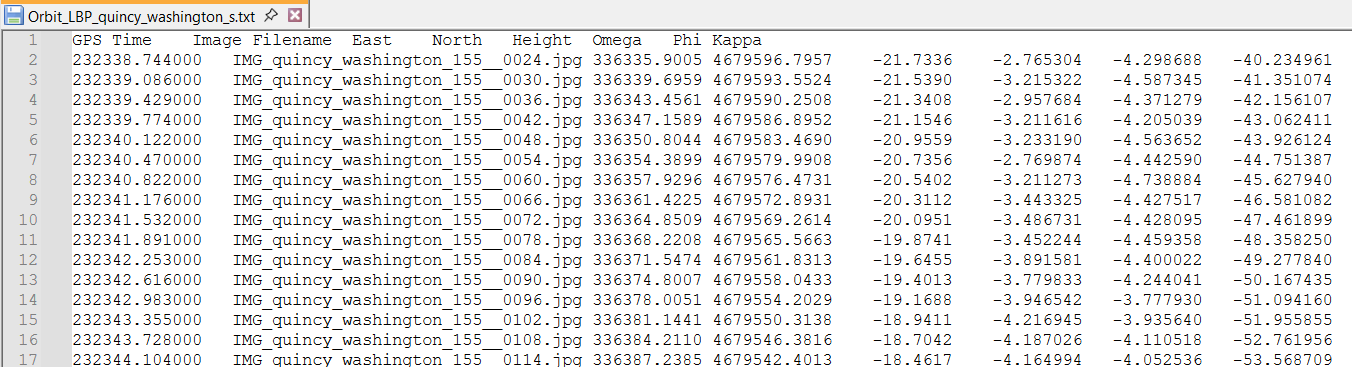
Text/CSV file fix template (Not mandatory):
Text (.txt) and .csv file upload is not mandatory but incase you are uploading then kindly maintain below format.
Example: